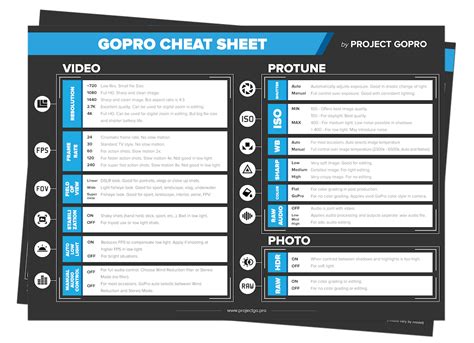
So, you’ve decided to get yourself the funnest camera in the world. A video camera, a still camera, and the undisputed king of POV footage. Fun galore. If there’s any complaint to be made about the GoPro, it’s that there’s too much going on in that little box. What the heck are all those settings? Well, I can assure you, the options are there for good reason.
Mounting your GoPro on a ski pole is a fantastic way to capture your skiing or snowboarding adventures from a unique perspective. Here's a comprehensive guide to help you get the perfect shot.

Mounting Options
There are several ways to mount your GoPro to a ski pole. Here are a few popular methods:
- Handlebar Mount: Just get a handlebar mount and put it on your ski pole that you use.
- DIY Method: You can pretty much mount it on anything. Or you can go with a DIY method, should work just as well, can't really go wrong.
- Old Ski Pole: But I just took an old shity one that I found in my basement, cut it in half then pounded it flat with a hamer. After this I stuck a flat mount on it and its worked well for me.
- Tripod Method: First cut the ski pole to length that you'd like. Then put one of the legs of the tripod in the ski pole. Next clamp the two other legs to the outside of the ski pole. Attach the tripod mount to the tripod and you are done.
- Hockey Stick: Have a old hockey stick laying around? Cut it the lenght you want, stick a flat mount on there BOOM. you have the mount, plus you already have a grip.
- Rubber and Electrical Tape: I put a thick piece of rubber about an inch wide right above my baskets, and wrapped it with electrical tape until it fit properly. It works amazing. When I am not using it I just pull the handle bar mount off and throw it in my pocket.
Additional Mounting Options
Here are some additional mounting options to consider:
- Helmet Mount: The helmet mount provides the most classic POV of them all. There’s no substitute for the helmet mount when you want to show people exactly what you experienced during your moments of glory on the hill.
- 3-Way Handle: If you’re snowboarding, you don’t have a pole already handy so you’ve gotta come up with a different solution. The 3-Way handle is your best option.
Tips and Tricks
- Check Angle: Use the GoPro app to check the camera angle on your smartphone before you start recording.
- Second Pole: Aditonally I grabbed a busted pole from my mountains pro shop and cut it down to about a foot and a half and did the same thing again so I can give it to someone else without poles to film.
- Waterproofing: I used some waterproofing spray bullshit my dad had. Sprayed the stick with. then hockey tape for grip, and a flat mount.
- Lightweight Mount: My friend mounted it on small pvc pipe or something, but it's better if the thing your mounting it on is light.
- Strapping: Next time out I decided that maybe some type of strapping might be called for, so I did not have to worry about holding the pole too much.
- Telescopic Poles: My ski poles are ski touring pole, telescopic so I can alter the length. Obviously, the longer the stick results in the edit the better the drone type effect and it's easier to edit to avoid that 360 fish-eye effect.
And, if you really want to get creative, check out tips and tools for effortless image editing and learn how to master the background remover video. Swap in a new background, add graphics, text, and much more.
Read also: Best GoPro Helmet Mounts
Introducing the Insta360 Ski Pole Mount
GoPro Settings for Skiing and Snowboarding
To get the best footage, it's important to understand your GoPro's settings. Here's a breakdown of some key options:
Resolution and Frame Rate
Resolution is how many pixels you’re capturing. Frame rate is how many images your camera is capturing per second. The higher the resolution you choose, the lower the frame rate options you’ll have available. Why does the frame rate matter? If you want to play everything in your video in real-time, it doesn’t. Shoot all day at 24fps.
- 4K = 3840 x 2160 pixels: Extremely high quality HD.
- 720 at 120fps: All of the super slow-mo scenes were filmed with this setting.
- 1440 at 48fps: This might be the best all around setting for action.
- 2.7K Superview at 24fps: Gorgeous high-res footage for real-time playback.
- 4K Superview at 24fps: In the future, this will become the standard HD resolution for recording and playback.
Photo Settings
- Resolution: You are able to choose a number of resolution settings for still photos, but I recommend always shooting at 12MP Wide.
- Burst: 30 photos in 3 seconds. Use this setting to take action sequences of your friends or aim the camera at yourself and trigger this setting just before hitting the air, dropping the cliff or ripping the pow.
- Interval: 1 photo every 0.5 second. If you want photos of yourself getting rad, the half-second interval is your best friend.
- Time lapse: 1 photo every 5 seconds. If you’re interested in creating a time-lapse video of the sunset, billowing clouds, snow stacking up during a storm or a bowl getting tracked out, this is for you.
Essential Accessories
Here are a few accessories that can enhance your GoPro experience on the slopes:
- Batteries: If you’re planning on a busy day of shooting on the hill, one battery won’t do the trick. I recommend having 3 batteries, and making sure they’re all topped-off before you get out in the weather.
- Micro SD memory cards: While one battery won’t do the trick, one card often will. If you pick up a 32 or 64 GB card, you likely won’t have to make any card changes while out shredding.
- Anti-fog inserts: I ruined a lot of footage before I discovered these little beauties. Moisture builds up inside your camera housing, and if it’s left unattended, it will create fog over the lens. Be careful about keeping moisture out of the body and let these inserts do the rest.
- GoPro app: The amazing GoPro app is the best thing to happen to GoPro shooting since the Hero2.
Sharing Your Footage
Mobile sharing: You’re having the best day of your season and you just captured the clip to prove it. Don’t wait till you get home to your computer. Share it on the lift.
I hope this gives you everything you need to hit the hills and hit record with confidence this winter. If you’ve got questions or comments, feel free to drop them in the comments below and I’ll do my best to keep the conversation going. Welcome to the Newschoolers forums!
Read also: Maximize Savings on Mount Snow Skiing
Read also: Understanding Western Snow Plow Mounts